
FAQs
About
There isn't currently a trial for the software. However there is a 30 day return window for the studio kit and a 14 day window for the software only version, so if you do purchase and decide it's not for you, you can return it for a full refund. You can see our full return terms here
MIDI Capture is a companion plugin to the Dubler app. The MIDI Capture plugin automatically connects and syncs to the Dubler 2 application - and records your melodies directly within the plugin. MIDI Capture then applies a cleaning algorithm, minimising the need to clean up unintended ghost notes and speeding up your workflow.
What we do is very different to most audio to MIDI solutions available in DAWs. Dubler isn’t just pitch-to-midi. With Dubler we use (and learn) all the timbral qualities of your voice. This means you can: accurately trigger a wide range of samples, control pitched instruments, apply pitch bend, control envelope, velocity and 4 CC values simultaneously.
The biggest difference is that we do all of this live, meaning you can hear your voice as any instrument or drum kit in real time. Other solutions out there are done post processing.
For purchases made for digital products through the Vochlea online store, we offer a 14-day return policy. For purchases made for physical products through the Vochlea online store, we offer a 30-day return policy. You can see our full return policy here
Payment & Shipping
If you are ordering to the United Kingdom your purchase will be sent via Royal Mail using their tracked 48-hour courier service. The dispatch date is typically same day or next working day.
For orders placed outside of the U.K. we ship by international courier. Delivery times vary depending on geography. Typically, deliveries to Germany takes 2-3 days, the rest of Europe takes 5-7 days and 10-15 days to the U.S. Please allow for 12 - 18 days shipping to Australia.
Please note that the current outbreak of Covid-19 has the potential to impact delivery services. Postal service disruption varies by country. We are currently processing shipments as normal, however a few select countries have placed restrictions on incoming goods. If in doubt please get in touch. All our shipments include a delivery tracking number.
All tracking information will be sent to the email used at checkout once your order has been dispatched. If you do not receive any tracking information after 2 working days please contact support at [email protected]
We currently ship to the following countries: United Kingdom, United States of America, Canada, Australia, New Zealand, EEC Countries (Countries in the European Economic Area). We don't currently ship to the Canary Islands
The Dubler Studio Kit can be purchased as a gift at checkout. If you're purchasing the software only version you can transfer the licence to someone else after purchase. Just complete the purchase and then contact support at [email protected] to transfer the licence.
We currently offer split payments in the UK, Canada and the United States.
Klarna is available to customers based in the UK and Sezzle is available to customers based in Canada and the United States
You can download an invoice via the orders section of your account here.
If you cannot see your invoice please contact us at [email protected]
Technical
For more information on latency, please see our help pages: Latency
We have frequent cycles of latency reduction— and it changes depending on your personal set-up.
Audio latency refers to a short period of delay (usually measured in milliseconds) between when an audio signal enters and when it emerges from a system. With the Dubler, this will be the time between you making a note with your voice, and when you hear the sound come from your system.
Dubler Studio Kits latency is below the audible range, and we’ve yet to hear any complaints of it being noticeable in anyone’s workflow when Dubler is set-up correctly. That includes testing with a wide range of professional musicians.
Please note, that while it’s possible to reduce latency, it’s impossible to eliminate it entirely.
To run Dubler 2 you will need a device that has either MacOS 10.13+ or Windows 10+
You can see our full specs here
Yes, Dubler works with any DAW that takes MIDI input. Think of Dubler like a MIDI controller but one that uses your voice rather than your hands
An internet connection is required just for the first time to initially login. Once this is done you can use Dubler without an internet connection, you will only need to login again if using Dubler on a different machine
Yes! Dubler 2 has a calibration process that allows a user to choose their own microphone as the input device and then calibrate it. We always reccomend using a dynamic microphone with Dubler 2
You can download the software on up to three computers, you'll just need to login again when using it on a new machine. Only one instance of Dubler can be running at a time, so you can't use it on two machines simultaneously
Yes, Dubler has been tested and runs natively on M1 & M2 Macs.
Dubler works with all audio interfaces on Mac.
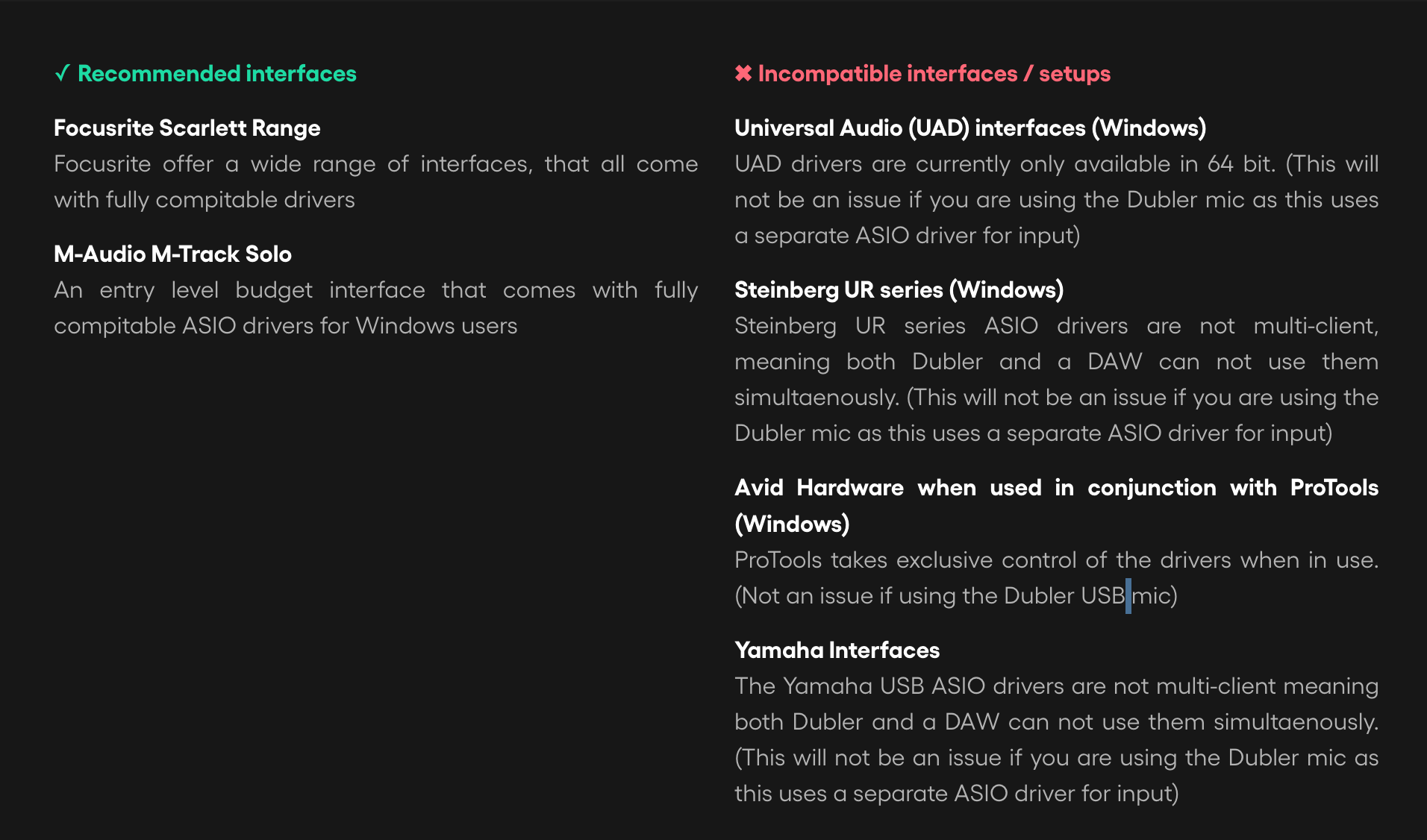
If you're on Windows your audio interface will need dedicated ASIO drivers, these can be found on the manufacturer's website. Some ASIO drivers do not allow for multi-client use, meaning only one app can use the driver at a time. If this is the case then only your DAW or Dubler can use the driver, but not both simultaneously. You can check if your driver supports multi-client use on the manufacturer's website. If you're unsure on whether your interface as multi-client drivers you can contact us here.
If you are using the Dubler mic you can use any audio interface as the output in your DAW, as the driver will not be needed as an input in Dubler.
The MIDI Capture plugin is compatible with all DAWs that support VST3 and AU format plugins. Currently MIDI Capture does not work with Pro-Tools as they do not support these formats
Dynamic mics are preferable for our use case as they are more suited to pick up focused signal sound, and consequently pick up less background sound. We’re interested in just the detectable triggers and pitch sounds from your voice so a dynamic mic helps eliminate any other sounds that might interfere with detection
We’re focused on the voice, as it’s our natural tool for audio expression, but there is scope to experiment with all sorts of audio inputs— including other instruments, or clicking, clapping or stamping your feet! We stress that whilst you can use other audio sources as an input, this is purely experimental and the results can vary depending on what you use
In order to get low latency when using Dubler we need to use an audio driver that can handle this low latency performance. Window’s own inbuilt drivers can’t do this so we need to use ASIO drivers.
Most audio interfaces come with their own dedicated ASIO drivers, which is what we strongly recommend using for the best experience. However if you don’t have an interface that comes with it’s own drivers we can use ASIO4ALL.
ASIO4ALL allows you to select the input and outputs you want to use for each app as well as adjusting the buffer size. For example, you can set your output in your DAW using ASIO4ALL, or use it to set a mic as an input in Dubler 2 if you do not have an audio interface or Dubler USB mic.
Please contact our support team at [email protected] and send them your full specs for your device.
Be sure to include the specific processor it runs on
Account
To update your Vochlea account email please contact us here
A serial code is only needed if you have purchased the Dubler Studio Kit as a gift or from a retailer. In this case the serial code will be on a card inside the box. All other licenses are attached automatically to the Vochlea account created with the email provided at checkout.
All you need to do is follow the download instructions emailed to you (check your SPAM and Junk mail). Once you have made a new password and logged in, you can download your licence from the Software Licences tab in your account.
Ableton Live Lite only comes with the Dubler Studio Kit - if you have ordered the software only you will not have a licence.
If you have ordered the Studio Kit, your Ableton Live Lite licence would have been emailed to you and available in your Vochlea Account. If you cannot see your licence please contact us at [email protected]
Please contact us at [email protected] and someone from our team will reset these for you
Sorry to hear that. Please check your spam and junk mail for the password reset email. If you cannot change your password please contact us at [email protected] and they will re-send you the link.
If it's still not working they can change your password manually for you
Please contact our support team at [email protected] with a photo of your serial card. Please include the 5-digit Product ID number which is located to the right to the serial number
Please contact our support team at [email protected] requesting a licence transfer to the email address you want. Please note, we can only transfer licences from the licence owner